Entities
Devices
Irrigation Plus creates one hub device ("Irrigation Plus") and one device per zone, named after the zone (e.g. a zone called Lawn becomes a device called Lawn). Each zone device hangs off the hub device, and all of a zone's entities are grouped under it.
Entity names follow Home Assistant's has_entity_name convention: the friendly name is the device name plus the entity descriptor, e.g. Lawn Duration, Lawn Bucket, Lawn Live bucket. The descriptors are translated into all supported languages.
Zone entities
For a zone called Lawn, the following entities are created (entity IDs shown for the default install):
| Entity | Name | Entity ID |
|---|---|---|
| Irrigation duration (the headline sensor) | Lawn Duration | sensor.irrigation_plus_lawn |
| Water balance "bucket" (mm/inch) | Lawn Bucket | sensor.irrigation_plus_lawn_bucket |
| Intra-day live estimate of the bucket | Lawn Live bucket | sensor.irrigation_plus_lawn_live_deficit |
| Net daily change applied to the bucket | Lawn Bucket delta | sensor.irrigation_plus_lawn_et |
| Last irrigation (timestamp) | Lawn Last irrigation | sensor.irrigation_plus_lawn_last_irrigation |
| Next scheduled irrigation (timestamp) | Lawn Next irrigation | sensor.irrigation_plus_lawn_next_irrigation |
| Cumulative water delivered (litres/gallons) | Lawn Water used | sensor.irrigation_plus_lawn_water_used |
| Water delivered by the most recent cycle | Lawn Last cycle water used | sensor.irrigation_plus_lawn_last_water_used |
| Irrigation multiplier (adjustable) | Lawn Multiplier | number.irrigation_plus_lawn_multiplier |
| Would the zone water now? | Lawn Irrigation needed | binary_sensor.irrigation_plus_lawn_irrigation_needed |
| Linked valve/switch currently running | Lawn Watering now | binary_sensor.irrigation_plus_lawn_watering_now |
| Irrigate this zone immediately | Lawn Irrigate now | button.irrigation_plus_lawn_irrigate_now |
A few diagnostic sensors (Last calculated, Last weather update, Weather data points, Drainage) are also created but disabled by default — enable them from the device page if you want them.
The internal entity ID suffixes are kept stable for backwards compatibility, so they don't always match the new display names (e.g. Live bucket lives at
…_live_deficit, Bucket delta at…_et). Reference entities by their entity ID in automations.
Hub entities
On the hub device:
| Name | Entity ID |
|---|---|
| Any zone needs water | binary_sensor.irrigation_plus_irrigation_needed |
| Water all zones | button.irrigation_plus_irrigate_all |
| Recalculate durations | button.irrigation_plus_calculate_all |
| Refresh weather data | button.irrigation_plus_update_weather |
| Pause automatic watering until a moment (rain delay) | datetime.irrigation_plus_rain_delay |
| Delay automatic watering 24 h | button.irrigation_plus_delay_24h |
| Delay automatic watering 48 h | button.irrigation_plus_delay_48h |
| Resume automatic watering (clear the delay) | button.irrigation_plus_resume_irrigation |
Duration sensor attributes
The duration sensor (sensor.irrigation_plus_[zone_name]) carries the full zone state as attributes:
| Attribute | Description |
|---|---|
id |
internal identification |
size |
the total area the irrigation system reaches in m2 or sq ft. |
throughput |
total amount of water that flows through the irrigation system in liters or gallon per minute. |
state |
disabled, manual, automatic |
bucket |
the bucket size in mm or inch |
unit_of_measurement |
seconds |
device_class |
duration |
icon |
default: mdi:sprinkler |
friendly_name |
[zone] Duration |
Sample screenshot:
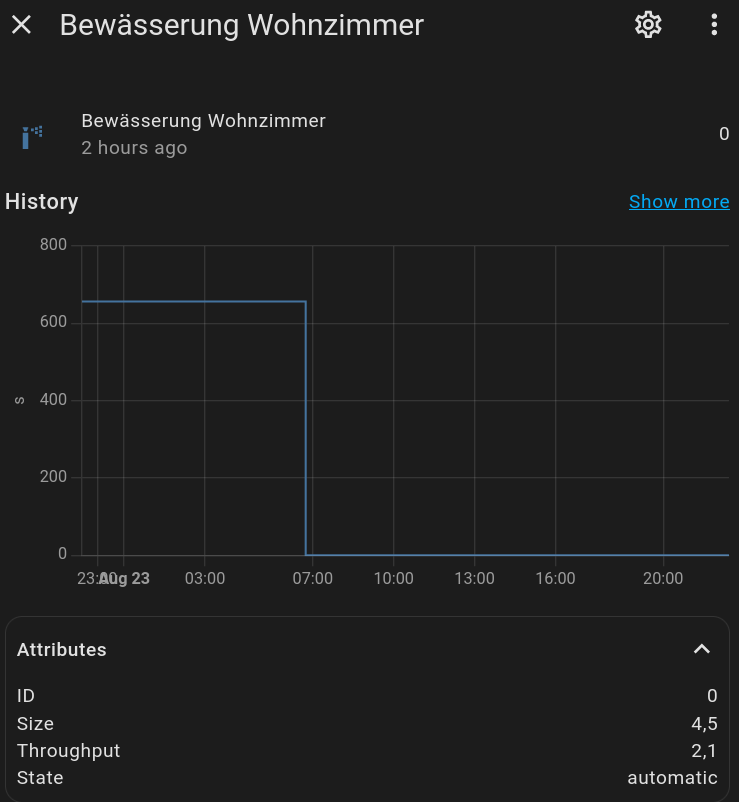
Most of these attributes are now also exposed as their own entities (see the table above), so you can usually reference those directly instead of building template sensors. If you do want a template sensor for an attribute, use a template like the following example for bucket:
``