The Zones dashboard
Main page: Usage
The Zones tab is the everyday dashboard. For each zone it answers the daily question — will it water, when, and if not, why? — and offers one-tap actions. Full configuration lives under Setup → My Zones; a gear icon on each card jumps there.
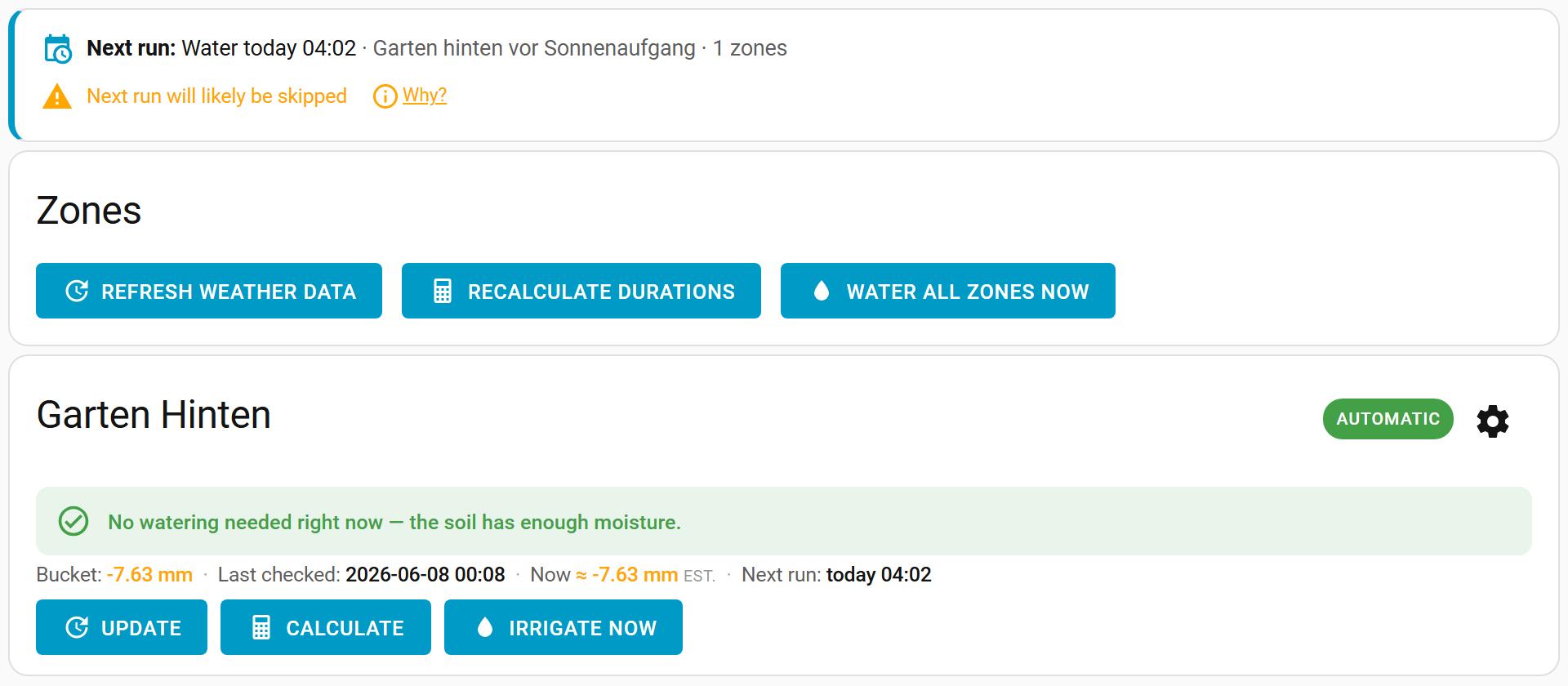
Per-zone decision
Each card leads with a plain-language decision derived from the zone's state, its moisture balance and the next scheduled run:
- Will water ~X at <time> — a deficit exists and the next run will irrigate it.
- Deficit ~X, but the next run will likely be skipped (…) — a deficit exists, but a skip condition will probably veto the run.
- No watering needed — the soil has enough moisture.
- Deficit ~X — no schedule waters this zone; trigger manually — there is a deficit but nothing scheduled targets the zone.
- Turned off / Not calculated yet — the zone is disabled, or hasn't been calculated yet.
The decision uses the same gate as the actual irrigation runner, so it will not promise watering that a skip condition would cancel.
Outlook banner {#outlook-banner}
Above the zone cards, a banner summarises what happens next, globally:
- Next run — the next scheduled irrigate run, with its time, schedule name and target zones.
- Skip preview — whether that run will likely be skipped. When it will, tap “Why?” to expand the reasons (for example Rain forecast — 8.6 mm ≥ 2 mm). This is a forecast and may change before the run.
- If no schedule waters your zones, the banner says so and (in the admin panel) offers a link to set one up.

Live estimate {#live-estimate}
The official bucket is recalculated once a day, at your calculation time. To give you a current picture in between, each zone also shows a small read-only “Now ≈ −X mm (est.)” chip next to the bucket — an estimate of how much the moisture balance has drifted since the last calculation.
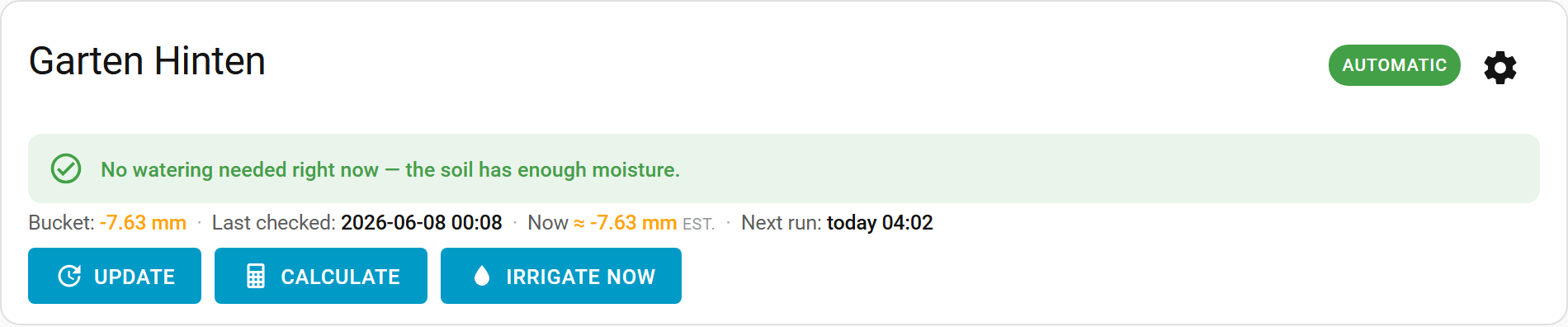
- Where your weather service provides hourly solar radiation (e.g. Open-Meteo), it uses the dedicated hourly FAO-56 Penman-Monteith reference-ET equation — not the daily equation run more often. Hover/tap the chip to see which method was used and the “as of” time.
- Other providers fall back to an estimate based on the day's temperature range, distributed across the day by sun position.
- The estimate never changes the stored bucket, and it is anchored to the last calculation so it does not double-count. By default it is also display-only and does not affect the watering decision. With live-estimate watering on it does: scheduled runs are triggered and sized from it, so the card's decision line quotes the duration derived from this estimate rather than the one the last calculation committed. See How it works.
Actions
For automatic zones, each card offers Update (fetch the latest weather/sensor data), Calculate (recompute the watering duration), and Irrigate now (open the linked valve immediately — this bypasses skip conditions). A row at the top applies the same actions to every zone at once: Refresh weather data, Recalculate durations and Water all zones now.
Run for a custom time {#run-zone}
Next to each zone's actions is a small Run for N min control: enter a number of minutes and press Run to water that zone for exactly that long. This is decoupled from the calculation — it ignores the computed duration, the deficit gate and any active rain delay — so it is handy for hand-watering a new planting or testing a valve. The water it delivers is still credited back to the bucket, so the next daily calculation stays honest. The same action is available as the run_zone service for automations.
While any run is in progress (a custom run, Irrigate now, or a scheduled run), the Run for N min control is replaced by a live countdown and a Stop button. Press Stop to end that zone's run immediately — the valve closes and the water already delivered is kept (the run is logged as partial). The same action is available as the stop_zone service for automations.
Not every zone with a run in flight is watering, and the control says which is which:
| Shown | What it means |
|---|---|
| A countdown | The valve is open and this is the time left. |
| Watering… | The valve is open, but the finish is set by a volume rather than a clock (a flow-metered run), so there is no time to count. |
| Queued… | The run is claimed but this zone's valve has not opened yet — it is waiting its turn behind another zone in a sequential or rotating chain, or in the queue of an OpenSprinkler or batch controller. No water is flowing. |
| Paused… | The controller has started this zone and is holding the rest of its time — see pausing a batch cycle. No water is flowing, and no time is being lost. |
Stop works in all four, and stopping a queued zone drops it from the chain or the queue before its valve ever opens.
Rain delay / vacation hold {#rain-delay}
Above the zone cards, a Pause watering control lets you stop all automatic and scheduled irrigation for a while — for a rainy spell, a holiday, or while you work on the system. Tap Delay 24 h or Delay 48 h for a quick hold; while a hold is active the banner shows “Paused until …” with a Resume button to lift it early.
- The hold gates only automatic runs (schedules and the daily decision). Manual actions — Irrigate now, Water all zones now and Run for N min — still work, so you are never locked out of watering on demand.
- A paused scheduled run is recorded in the zone's run history as Paused (rain delay), so it is clear why nothing ran.
- The same hold is exposed on the hub device as the Pause until
datetimeentity plus Delay 24 h / 48 h and Resume buttons (see Entities), and as theset_rain_delay/clear_rain_delayservices — so you can automate it (e.g. pause when a "vacation mode" helper turns on).
A card for non-admin users
The panel itself is admin-only, but you can put the same everyday view on any dashboard with the shipped Lovelace card so non-admin household members can see status and water on demand.
Main page: Usage