Lovelace card (for non-admin users)
Main page: Usage
The Irrigation Plus panel in the sidebar is admin-only. To give non-admin household members an everyday view, the integration also ships a Lovelace card that mirrors the Zones dashboard — status and manual irrigation, without any access to configuration.
Adding the card
The card is registered automatically — there is no manual resource to add. On any dashboard:
- Edit dashboard → Add card, search for “Irrigation Plus Zones”, or
- add it as YAML:
type: custom:irrigation-plus-zones-card
If it does not appear right after updating the integration, do a hard refresh of your browser (Ctrl/Cmd-Shift-R) to clear the cached frontend.
What it shows
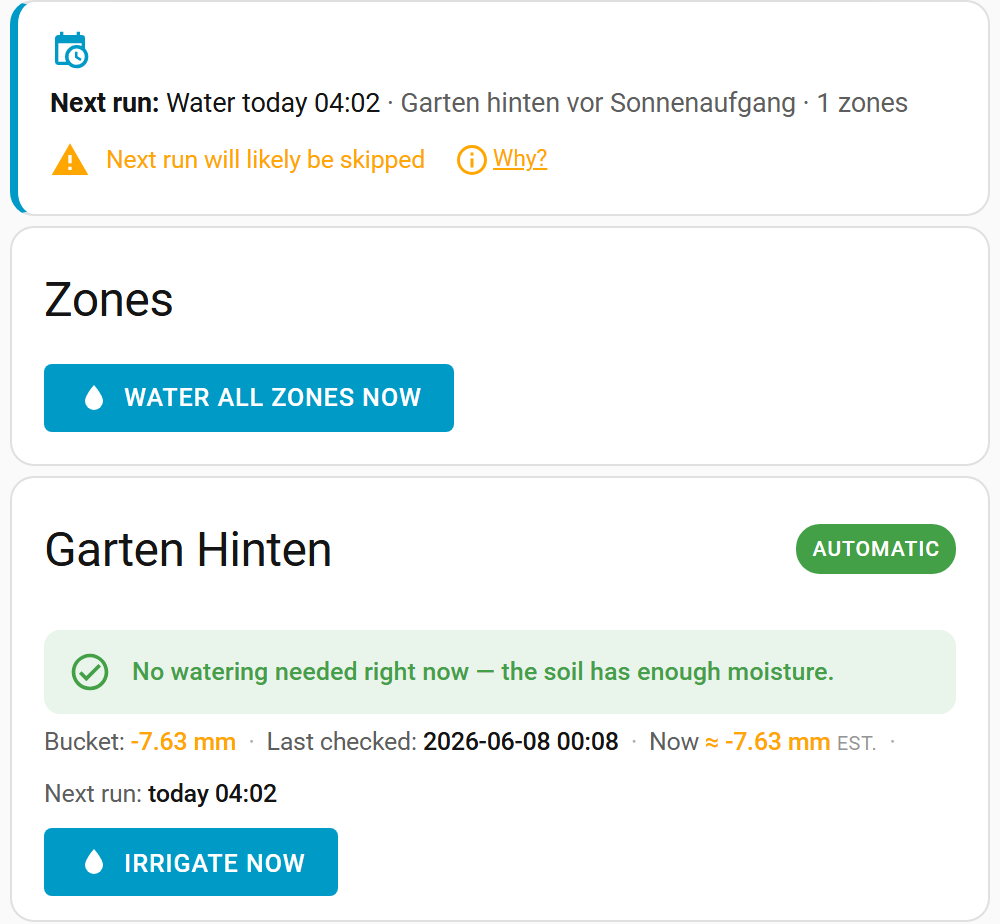
The card shows the same per-zone status as the dashboard — the decision, the bucket and live estimate, the next scheduled run, and the global outlook banner — without the settings gear, schedule links or the setup wizard. With the default actions: irrigate, only the Irrigate buttons are shown (no Update / Calculate).
Permissions
Any authenticated Home Assistant user can use the card. The status data and the manual Irrigate action are available to non-admins; configuration stays admin-only (it lives in the panel, which the card does not expose).
Options
| Option | Default | Description |
|---|---|---|
actions |
irrigate |
Which buttons to show: irrigate (status + manual Irrigate only), none (read-only status), or full (also Update / Calculate, like the admin panel). |
Example — a read-only status display (e.g. for a wall tablet or a shared dashboard):
type: custom:irrigation-plus-zones-card
actions: none
Main page: Usage