Sensor group configuration
Main page: Configuration
Previous: Module configuration
Next: Experimental
Sensor groups live under Setup → Advanced. The setup wizard creates and wires a sensor group for you, so most setups never need this page — come here to mix sensors with a weather service or share one group across zones.
Sensor groups define what sources provide the weather data to be collected and calculated on to determine irrigation duration. You can use any numeric Home Assistant sensor, regardless of its source. Additionally, if you configured a weather service in this integration, you can retrieve the data from that as well.
Adding a sensor group
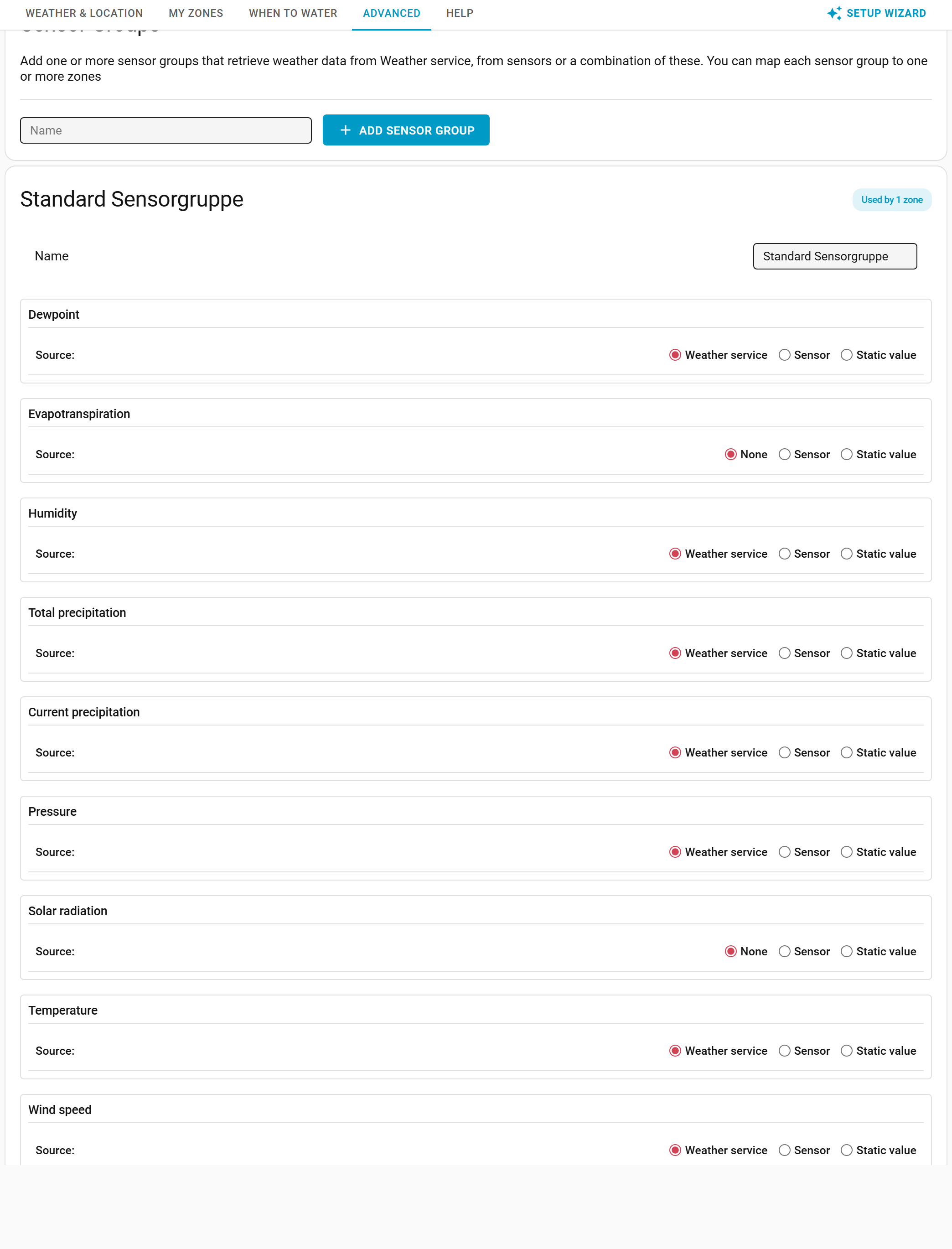
Enter a sensor group name and select Add sensor groups. Your sensor group is added and you 'wire up' the sensors.
Configuring a sensor group
Apart from changing the name, you can specify the source where to retrieve the weather data metrics. Metrics can be retrieved from a weather service (assuming you set it up), a sensor or a static value. When using a sensor or static value as a source, take care to make sure the unit the integration expects is the same as your sensor provides. You can choose which aggregation to use like average, maximum, minimum etc.
It's recommended to use actual sensor sources as much as you can and only rely on weather services as needed. If your zone is covered (such as a green house), of course you can set the total precipitation to 0.
The following data can be provided:
| Data | Required | Available sources | Available units | Expected aggregation |
|---|---|---|---|---|
| Current precipitation (unused) | No | Weather Service Sensor Static value |
in/h mm/h |
Average |
| Dewpoint | Yes | Weather Service Sensor Static value |
°C °F |
Average |
| Evapotranspiration | No | None (module will calculate it) Sensor Static value |
in mm |
Average |
| Humidity | Yes | Weather Service Sensor Static value |
% | Average |
| Total precipitation | Yes | Weather Service Sensor Static value |
in mm |
Delta |
| Pressure (*see notes below the table) | Yes | Weather Service Sensor Static value |
hPa inch Hg millibar psi |
Average |
| Solar Radiation | No | None (requires module to estimate it) Sensor Static value |
MJ/day/m2 MJ/day/sq ft W/m2 W/sq ft |
Average |
| Temperature | Yes | Weather Service Sensor Static value |
°C °F |
Average |
| Wind speed | Yes | Weather Service Sensor Static value |
meter/s mile/h km/h |
Average |
Please note:
- Units are auto-detected from the sensor. When a source sensor reports its own unit (Home Assistant's
unit_of_measurement, e.g.W/m²for solar radiation), that unit is used for the conversion automatically and takes precedence over the unit picked here. The unit you select is only a fallback for sensors that don't report one. This avoids the common pitfall of, for example, aW/m²solar sensor being read asMJ/day/m2— which makes the calculated evapotranspiration far too high. Solar radiation in particular must end up inMJ/day/m2; a measured value above the physical clear-sky maximum is clamped and logged as a warning (check the sensor's unit, or switch the PyETO solar-radiation behaviour to one of the "estimate" options). - If you use a weather service, make sure your home zone coordinates are set correctly so the data is correct. This is especially true if you set the coordinates manually in the configuration.yaml.
- Pressure can either be absolute or relative pressure: absolute barometric pressure is the actual pressure measured at your location, while relative barometric pressure is the pressure calculated at sea level. Check the source of your data to find out whether it provides absolute or relative pressure.
- Humidity for your sensor group is the air humidity / atmospheric humidity, not soil humidity. Soil Humidity sensors do not provide useful information for this integration and cannot be used.
- Wind speed needs to be measured at 2 meters height. If you are using Open Weather Map this is automatically done for you, but if you do not, you need to make sure the input sensor returns the wind speed at the correct height. You can use a template sensor like the following for this:
sensor: - platform: template sensors: wind_at_2m: friendly_name: Wind Speed at 2m value_template: "{{states('[name of your wind speed sensor (WSmeasured)]')|float()*(4.87/log((67.8*[height the wind speed was measured on in meters (H)])-5.42))}}" - Total precipitation is the total amount of precipitation you want to take into account for the calculations. Use the 'Delta' aggregation type along with a sensor source that accumulates over a time period, usually named something like 'daily rain', 'weekly rain', or 'total rain'. The delta aggregation will correctly handle value resets (such as daily rain becoming zero at midnight). Keep in mind that the total precipitation is expected to be a total over the time period, not the current precipitation rate.
- Current preciptation is currently unused. Total precipitation should be used instead.
Deleting a sensor group
Use the button at the bottom to delete a sensor group. Note you can only delete sensor groups that are not used by any zones.
Now you are ready to use the integration!
Main page: Configuration
Previous: Module configuration
Next: Experimental