When to Water
Main page: Configuration
Previous: My Zones
Next: Schedules
The Setup → When to Water tab holds everything that controls when things happen: the automatic update and calculation times, the conditions that veto a run, how often watering is allowed, how multiple zones run, and the recurring schedules that actually trigger irrigation.
The order of a typical day:
- Weather updates collect data throughout the day (see below).
- The automatic calculation turns the collected data into a per-zone duration (default 23:00).
- A recurring schedule (e.g. sunrise, finish before) waters the zones — unless a skip condition or the days-between limit vetoes it.
Automatic weather data update
If enabled, specify how often the weather-data update should happen (minutes, hours, days). You can also set an update delay to postpone the first update — useful in case your sensors do not provide a value immediately after Home Assistant starts.
As calculation needs weather data, make sure to update your weather data at least once before calculating.
Automatic duration calculation
If enabled, set the time of calculation (HH:MM). Calculation uses the weather data collected by updates to determine the irrigation duration. During calculation each zone consumes only the readings it needs (anchored to its own watermark) — the shared weather data is not wiped, so other zones keep their history.
Note: weather data is pruned automatically. Old readings are removed from the shared buffer once every zone that needs them has consumed them (with a hard cap of a few days). There is no "pruning time" to configure. You can still wipe everything manually via Setup → My Zones → Bulk Actions → Clear all weather data.
Skip Conditions
These settings let you automatically skip irrigation when conditions are unfavourable. All checks are independent — any one of them can veto an irrigation event. The dashboard's outlook banner shows you in advance whether the next run will likely be skipped, and why.
When rain is forecast
A single control decides how upcoming forecast rain affects watering. Requires a weather service to be configured.
- Ignore it — forecast rain is ignored; runs use the calculated duration.
- Water less — the upcoming forecast precipitation (summed over the look-ahead window) is subtracted from the deficit used to compute the duration, so the zone waters a little less. The bucket keeps the true deficit, so when the rain actually falls it tops the bucket up the rest of the way — the forecast rain is never double-counted once collected. If the rain misses, the next run makes up the difference. With Live estimate on, a zone without a flow sensor is sized from the live deficit minus the same forecast rain; the Live bucket itself still shows the true deficit, and only the run shortens.
- Skip watering — the run is skipped entirely when the total forecast precipitation across the look-ahead window reaches or exceeds the precipitation threshold (default 2 mm).
For Water less and Skip watering you also set the Forecast look-ahead (days) — how many forecast days are added together. Both modes count in rolling 24-hour steps from the moment the run starts: 1 (the default) means the 24 hours from the start of the run, 2 the next 48 hours, and so on.
Worked example (Water less). A zone has a 10 mm deficit and 4 mm of rain is forecast within the look-ahead window. The run delivers 6 mm and stops; the bucket is left 4 mm short, which the forecast rain is expected to fill. If the rain doesn't come, the deficit is still there and the next run waters it.
Upgrade notes. Before v2026.06.13 the look-ahead window was hard-wired to two days; the default is now 1 day (set it back to 2 for the old behaviour). The Water less option was previously a separate forecast-weighted durations toggle on the Experimental tab — it now lives here, backed by the same setting, so existing configurations are unchanged.
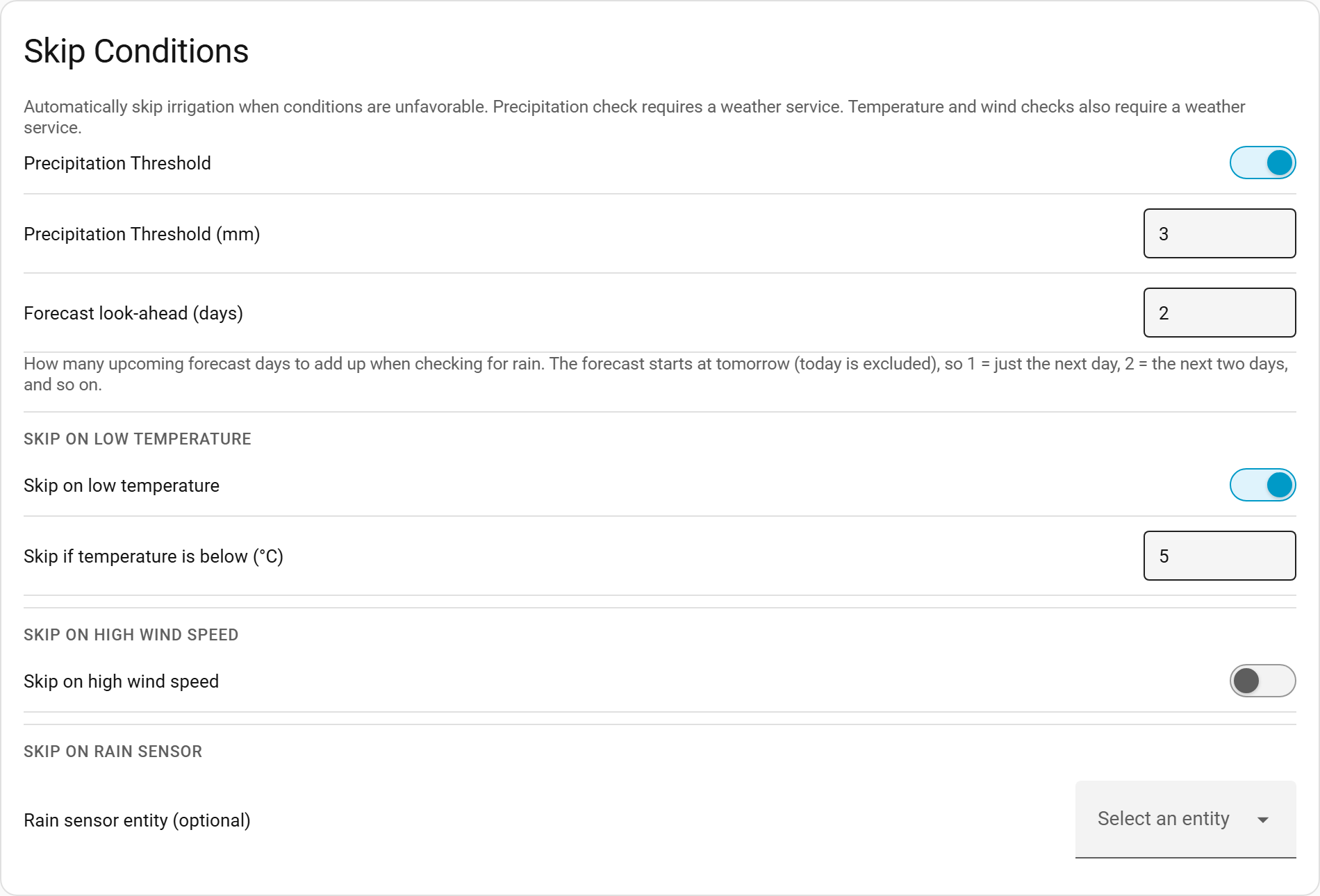
Skip on low temperature
If enabled, irrigation is skipped when the current temperature (from the weather service) is below the configured threshold (in °C). Useful for avoiding irrigation in near-freezing conditions.
- Default threshold: 5 °C
- Requires a weather service to be configured.
Skip on high wind speed
If enabled, irrigation is skipped when the current wind speed (from the weather service) is above the configured threshold (in m/s). Useful for avoiding evaporation or drift in windy conditions.
- Default threshold: 6.9 m/s (≈ 25 km/h)
- Requires a weather service to be configured.
Skip on frost
If enabled, irrigation is skipped when frost is expected, to protect pipes and plants from freezing. The guard compares two values and skips when the lower of them is below the configured threshold (default 1 °C):
- the current temperature from the weather service, and
- the forecast minimum for the coming night (the next forecast day).
This is distinct from Skip on low temperature: that guard looks only at the current reading, whereas the frost guard also looks ahead so a clear, sub-freezing night is caught even when it is still mild at run time. Requires a weather service to be configured. Default off.
Rain sensor
Optionally specify a binary_sensor entity. If that sensor is on when irrigation would normally fire, the event is skipped. No weather service is required for this check — it works with any binary sensor (e.g. a physical rain detector, a virtual sensor from a weather integration).
Leave this field empty to disable the rain sensor check.
Days between irrigation events
Configure the minimum number of days that must pass between irrigation events. This setting allows you to control how frequently irrigation can occur, which is useful for:
- Water conservation: Ensure adequate time between watering sessions
- Plant health: Allow soil to partially dry between irrigations
- Local restrictions: Comply with watering schedules or restrictions
How it works:
- Default value: 0 (no restriction - maintains current behavior)
- Range: 0-365 days
- When set to 0: Irrigation events can fire daily if conditions are met (default behavior)
- When set to a value > 0: Irrigation events will only fire if the specified number of days have passed since the last irrigation event
Example scenarios:
- Set to 1: Allow irrigation every other day maximum
- Set to 3: Allow irrigation only every 3 days minimum
- Set to 7: Weekly irrigation maximum
The system automatically tracks the number of days since the last irrigation event. If an irrigation trigger occurs but insufficient days have passed, the event is skipped and the days counter continues to increment. When enough days have passed, the next trigger will fire the irrigation event and reset the counter.
This feature works alongside the skip conditions above — if several restrictions apply, all must be satisfied for irrigation to occur.
Zone sequencing
When multiple zones have a linked entity configured and irrigation fires, this setting controls whether they run at the same time or one after another.
- Parallel (default): all linked entities open simultaneously. Each closes after its own calculated duration.
- Sequential: zones run one after another. The integration waits for each zone to finish before starting the next. Zones with 0 seconds calculated duration are skipped automatically.
- Rotating: zones take turns in short bursts instead of each running to completion in one go. A zone waters for up to the maximum consecutive watering time, then yields to the next zone and rejoins the rotation until its full duration is spent. This is for soil that cannot absorb a long run without pooling or running off: the same total water arrives in slices the ground has time to take up.
When Rotating is selected, two further settings appear:
- Maximum consecutive watering time (default 5 minutes) — the longest a zone waters before yielding its turn.
- Minimum absorption time (default 0, disabled) — the least time that must pass before a zone's next turn, giving the water time to soak in. This is a wait between one zone's turns, not between zones, so other zones keep watering during it.
Rotating takes much longer than the total watering time. The absorption waits are wall-clock time on top of the watering itself: two zones needing 10 minutes each, in 5-minute slices with a 10-minute absorption time, occupy 25 minutes rather than 20. A finish-anchored schedule accounts for this and starts early enough, but it is worth knowing before setting a long absorption time on a narrow window.
This setting only reaches zones the integration actuates itself. Self-closing service zones are all dispatched together whatever it is set to — the hardware owns each close, so there is nothing to wait for. OpenSprinkler station zones are sequenced by the integration, because whether two stations run at once is a flag in the controller's own configuration. Batch / queue controller zones are always sequential by construction: a queue waters one valve at a time, and their order comes from the order they are sent in. See Watering mode.
Pump / master switch {#master-switch}
If a pump or main valve must be powered before any zone can water, configure an optional master switch here. The sub-settings only appear once a master entity is set.
- Master entity — a
switch,valveorinput_booleanthe integration turns on before the first zone of a cycle. Leave empty to never touch a master (e.g. a pressure-controlled waterworks that starts on its own). - Kicker (optional) — some pressure-controlled pumps don't restart promptly when merely powered; the kicker pulses the master off → pause → on to force a start. The pause is configurable.
- Settle delay — how long to wait after power-on before the first valve opens (pressure build-up), default 10 s.
- Turn off after irrigation (optional, default off) — off = the master stays powered (a self-monitoring pump); on = the integration turns it off after the last zone's planned end, and only once no run is still active.
The master applies to every path (scheduled, Irrigate now, and manual runs) and to both classic and self-closing zones.
Do not configure a master here if your controller switches its own pump. A batch / queue controller such as an ESPHome sprinkler component usually drives its pump alongside its valves. Setting a master switch as well gives the same pump two independent owners, each deciding when it runs — which is the failure this master model exists to prevent. Use one or the other.
Crash caveat: with Turn off after irrigation enabled, a Home Assistant outage after the master turns on but before the scheduled off leaves the master on — a non-self-protecting pump could dead-head or run dry. The integration can't prevent this alone; the master device must carry its own protection (dry-run cutoff, max-on timer). This is exactly why the option is off by default — a self-monitoring pump omits it and carries no crash exposure.
Recurring schedules
Below these settings, the same tab hosts the recurring schedules — the daily/weekly/monthly/interval/sun-based triggers that actually start irrigation. They are covered on their own page: Schedules.
Unit System Responsiveness
Zone numbers are stored in the units Home Assistant is configured for, not in a canonical unit. So when you switch Home Assistant between metric and US customary, Irrigation Plus rewrites the stored numbers to preserve what they mean — it does not simply relabel them. Switching the unit system:
- Converts every depth on each zone (bucket, maximum bucket, drainage rate, minimum deficit to irrigate), plus zone size and throughput. A minimum deficit of
-10mm becomes-0.39in — the same depth of water, written the new way. Leaving the digits alone would turn it into a deficit no bucket ever reaches, silently stopping every deficit-gated run. - Logs what it did, one line per zone naming the fields it converted, plus a summary of how many zones were updated.
- Refreshes the sensor entities and the panel, so they show the converted numbers under the new unit label rather than the old digits.
A change made in the Home Assistant UI is applied immediately — no restart or integration reload. A change made in configuration.yaml is picked up during the restart it already requires. The conversion is guarded by the unit system recorded in Irrigation Plus's own storage rather than by the change event, so it happens exactly once per switch and repeating it is harmless.
Not converted, deliberately: fields you have left empty stay empty — a blank maximum bucket means "no ceiling" and is not given one. The
current_drainagesensor attribute is a read-only diagnostic that is always in mm and is overwritten by the next calculation.
Main page: Configuration
Previous: My Zones
Next: Schedules